如果你搜索“印象笔记迁移到 Notion”,真正要解决的通常不是“点哪个按钮”,而是这三个问题:
- 我的笔记、图片、附件和笔记本结构能不能完整迁移?
- Notion 官方导入够不够用,还是要先导出 ENEX 再批量处理?
- 迁移失败、重复导入、Token 失效、图片丢失时怎么补救?
这篇文章按真实迁移流程来写:先判断方案,再备份,再导入,最后验收。小规模用户可以直接走 Notion 官方导入;笔记很多、账号在印象笔记中国区、需要可控备份和断点续传时,更适合用 evernote-backup + enex2notion 的开源工具链。
先给结论:你应该选哪种迁移方式?
| 情况 | 推荐方案 | 原因 |
|---|---|---|
| 笔记不多,主要是文字 | Notion 官方 Evernote 导入 | 最省事,不需要命令行 |
| 笔记在国际版 Evernote | 先试 Notion 官方导入 | 授权链路更直接 |
| 笔记在印象笔记中国区 | evernote-backup --backend china | 官方导入不一定适合中国区账号 |
| 超过几千条笔记 | 分批 ENEX 导出 + 批量导入 | 更容易重试和排查 |
| 图片、附件很多 | 先本地备份,再小批量导入 | 方便对照检查缺失内容 |
| 你在意长期可迁移性 | 保留 ENEX 原始备份 | 不把唯一副本押在 Notion |
Notion 官方文档显示,Evernote 笔记本会导入为 Notion 页面,笔记会变成数据库条目;官方也提示 Evernote 导入在约 5,000 条笔记以内更可靠,较大的导入可能失败,图片也可能需要迁移后清理。因此,大量笔记用户不要一上来全量导入,先抽样测试更稳。
迁移前准备:不要直接开干
正式迁移前,建议先做一次“迁移盘点”。这一步很无聊,但能避免最后变成一堆重复页面和丢附件的 Notion 数据库。
| 检查项 | 怎么做 | 为什么重要 |
|---|---|---|
| 笔记数量 | 统计全部笔记和主要笔记本 | 决定是否分批 |
| 大附件 | 找出图片、PDF、录音较多的笔记 | 这些最容易出问题 |
| 标签体系 | 记录常用标签,不常用标签直接放弃 | Notion 更适合数据库属性 |
| 笔记本结构 | 标出真正还在用的笔记本 | 不要把历史垃圾完整搬过去 |
| 原始备份 | 保留 ENEX 或本地导出 | 迁移失败时可以重来 |
我的建议是:迁移不是搬家公司的工作,而是一次知识库重构。不要把所有旧内容原封不动塞进 Notion。真正有价值的是保留可查、可复用、可继续维护的内容。
如果你还不清楚 ENEX 是什么,可以先看这篇前置说明:ENEX 文件是什么:印象笔记导出、备份与迁移前检查清单。
方案一:使用 Notion 官方 Evernote 导入
适合人群:
- 笔记数量不大。
- 主要使用国际版 Evernote。
- 不想使用命令行。
- 能接受导入后手动整理格式、图片和属性。
基本流程:
- 打开 Notion 桌面端或网页版。
- 进入
Settings→Import。 - 选择
Third party imports→Evernote。 - 登录并授权 Evernote。
- 勾选要迁移的 notebook。
- 选择导入到 private space、teamspace 或已有数据库。
- 导入后抽查笔记、图片、附件和日期字段。
官方导入的优点是简单,缺点是可控性较弱。尤其是大批量迁移时,你很难像脚本那样精确知道哪个文件失败、哪一批需要重跑。
官方导入适合怎么分批?
不要按“全部笔记”一次性导入。更好的分批方式是:
- 先选 1 个不重要的小笔记本测试。
- 再选 1 个含图片、附件、表格的笔记本测试。
- 确认结构能接受后,再迁移核心笔记本。
- 历史归档笔记本最后处理,甚至可以只保留 ENEX 备份。
这样做的好处是,迁移失败的损失小,也能尽早发现 Notion 对图片、附件、日期、标签的处理方式是否符合你的预期。
方案二:用 evernote-backup 导出印象笔记 / Evernote
如果你使用的是印象笔记中国区,或者想先把所有数据握在自己手里,可以用 evernote-backup 做本地备份和 ENEX 导出。
先安装:
pip install evernote-backup连接印象笔记中国区:
evernote-backup init-db --backend china --force如果你使用国际版 Evernote,可以根据工具文档使用对应 backend。初始化后执行同步:
evernote-backup sync导出为 ENEX:
evernote-backup export ./evernote-export导出完成后,不要急着删本地文件。建议把 evernote-export 复制到一个长期备份目录,比如移动硬盘、NAS 或加密云盘。ENEX 是你迁移失败时的“回滚点”。
方案三:用 enex2notion 批量导入 Notion
enex2notion 适合技术用户,尤其适合这些场景:
- 你已经有多个
.enex文件。 - Notion 官方导入不稳定。
- 你希望失败后可以重试。
- 你想按笔记本、主题或年份分批导入。
安装:
pip install enex2notion获取 Notion token_v2
打开 Chrome 开发者工具,在 Notion 页面里找到 Cookie 中的 token_v2,复制它的值。
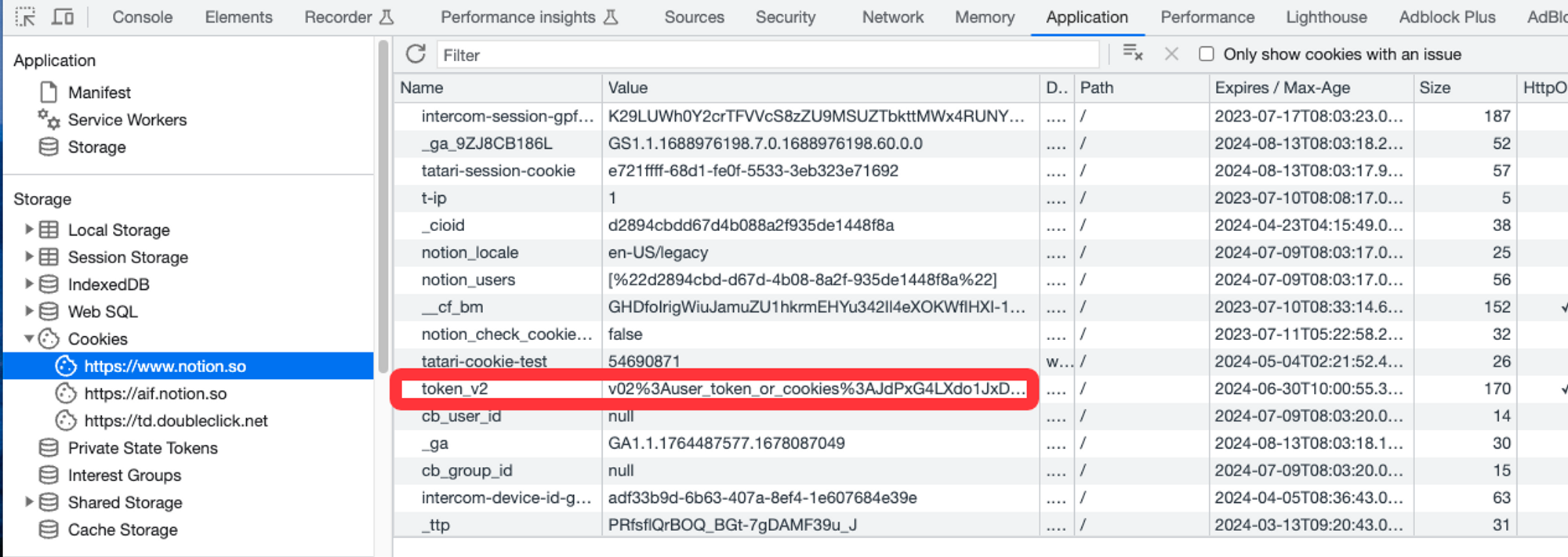
注意:token_v2 等同于你的登录凭证,不要发给别人,不要写进公开仓库。导入完成后,如果担心泄露,可以退出所有设备或重新登录刷新会话。
单个 ENEX 导入
enex2notion --token {token} --done-file notebook-done.txt notebook.enex--done-file 很重要。它会记录已经处理过的项目,失败后重跑时可以减少重复导入。
批量导入脚本:适合大量笔记
如果你导出了很多 .enex 文件,可以用脚本批量处理。先安装重试工具:
pip install shell-retry创建 process_enex_files.sh:
#!/bin/bash

output_dir="$1"
token="$2"

find "$output_dir" -type f -name "*.enex" -print0 | while IFS= read -r -d '' file; do
  filename=$(basename "$file")
  echo "Importing $file"

  shell-retry --retry-count 30 --interval-max 30 --interval-min 5 -- \
    enex2notion --token "$token" --done-file "done_$filename.txt" "$file"
done
执行:
bash process_enex_files.sh ./evernote-export "{token}"如果某个文件反复失败,不要立刻重跑全部。先把失败的 ENEX 单独拿出来,看看是否是附件太大、网络中断、Token 失效,或者单个笔记内容异常。
迁移后验收清单
迁移完成不等于迁移成功。至少抽查这些内容:
| 验收项 | 检查方式 |
|---|---|
| 笔记数量 | 对比源笔记本和 Notion 数据库条目数 |
| 图片 | 打开含多张图片的旧笔记对照 |
| 附件 | 检查 PDF、音频、压缩包是否能打开 |
| 标题 | 看是否出现乱码、重复标题或空标题 |
| 日期 | 检查 created / updated 字段是否还能用 |
| 标签 | 确认是否需要手动转成 Notion Select / Multi-select |
| 重复笔记 | 搜索同名标题,处理重复导入 |
我会额外建一个 Notion 数据库视图:迁移待检查。把重要笔记先打上 Needs review,不要幻想一天内把十年的笔记全部整理干净。先确保能搜到、能打开、能继续用。
常见问题
印象笔记迁移到 Notion 会保留原来的笔记本结构吗?
官方 Evernote 导入通常会把 notebook 变成 Notion 页面,里面的 notes 变成数据库条目。用 ENEX 批量导入时,最终结构取决于你的导入方式和分批策略。建议按原笔记本分别导出和导入,后续更容易整理。
ENEX 文件可以直接导入 Notion 吗?
Notion 官方导入主要走 Evernote 授权和常见文件格式导入。对于 .enex,更可控的方式是用 enex2notion 这类工具处理,或者先转换成其他格式。大量笔记不要只依赖单次官方导入。
图片和附件会丢吗?
有可能。尤其是历史很久、附件很大、网络不稳定或导入批次过大的情况。迁移后一定要抽查图片、PDF 和音频附件。重要资料建议保留 ENEX 原始备份。
token_v2 安全吗?
token_v2 是敏感登录凭证。只在本机脚本里临时使用,不要截图分享,不要提交到 GitHub,不要放进公开教程或云笔记。导入完成后可以重新登录 Notion,让旧 token 失效。
已经重复导入了怎么办?
先按导入时间或标题排序,确认重复范围。如果重复发生在某个批次,优先删除那一批,而不是手动逐条删。下次导入一定使用 --done-file,并按小批次执行。
迁移后还要保留印象笔记吗?
至少保留一段时间。我的建议是:Notion 使用稳定 1-3 个月后,再考虑取消旧订阅或清理旧账号。ENEX 本地备份则建议长期保存。
更推荐的长期知识库结构
迁移到 Notion 后,不要继续沿用“几十个笔记本 + 几百个标签”的老结构。Notion 更适合用数据库属性管理:
| 属性 | 示例 |
|---|---|
| Type | 文章、灵感、项目资料、读书笔记、会议记录 |
| Topic | AI 工具、写作、产品、运营、生活 |
| Status | 未整理、已整理、可复用、归档 |
| Source | Evernote、网页剪藏、手动创建 |
| Review | 需要检查、已检查 |
如果你的目标不是单纯换工具,而是建立一个长期可复用的资料系统,可以继续看:如何搭建个人 AI 知识库:YouTube、B站、X、播客内容采集工作流。
总结
印象笔记迁移到 Notion,最稳的路线不是“找到一个万能按钮”,而是:
- 小规模先试 Notion 官方导入。
- 大规模或中国区账号先用
evernote-backup做本地备份。 - 用 ENEX 分批迁移,必要时通过
enex2notion重试。 - 迁移后做图片、附件、日期和重复内容验收。
- 保留 ENEX 原始备份,不把知识库唯一副本锁死在任何一个平台。
工具会变,但原则不变:先备份,再迁移;先小批量验证,再全量执行;先保证资料可恢复,再追求整理得漂亮。
参考来源
- Notion 官方帮助文档:Import data into Notion
- evernote-backup 项目:https://github.com/vzhd1701/evernote-backup
- enex2notion 项目:https://github.com/vzhd1701/enex2notion